TikTok ad sizes and specs for 2026 (with measured safe zones)
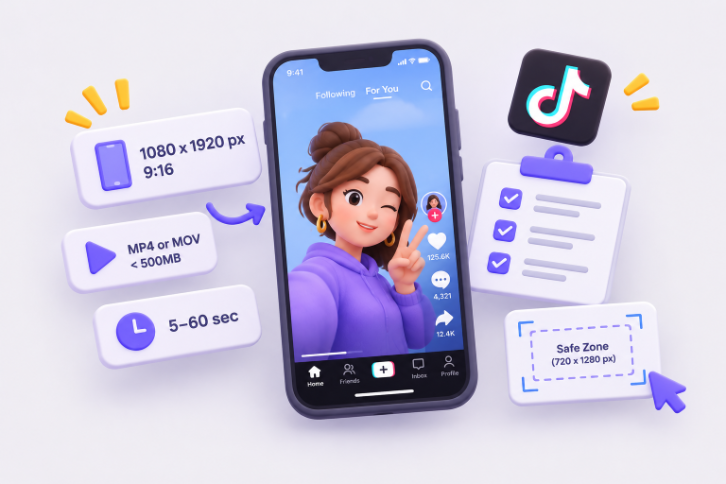
TABLE OF CONTENTS

TL;DR
TikTok ad specs in 2026: upload vertical 9:16 video at 1080 x 1920 pixels (TikTok's minimum is 540 x 960), as MP4 or MOV, under 500MB. Keep text, logos and CTAs out of the top 240 px, the bottom 660 px and a 120 px margin on each side. Longer captions and shopping anchors push the bottom margin past 1,000 px.
- ✅ Size: 1080 x 1920 px, 9:16. Square (1:1) and horizontal (16:9) are accepted for In-Feed ads, but they play with bars and lose impact.
- ✅ File: MP4 or MOV, 500MB or less. Auction In-Feed ads run up to 10 minutes; TopView runs 5 to 60 seconds.
- ⚠️ Safe zone: in TikTok's standard template only about 38% of the frame is fully safe. With an anchor and a four-line caption, it drops to about 20%.
- 🎨 Carousel ads: 2 to 35 images at 720 x 1280, 640 x 640 or 1200 x 628, and music is required.
- ❌ Don't copy safe-zone numbers from random blogs. We measured ours from TikTok's own downloadable templates.
Search for TikTok ad specs and you'll find a lot of confident pixel numbers. Some say keep 150 px clear at the top. Others say 350 to 400 px at the bottom. Almost none of them say where the numbers come from.
That's because TikTok doesn't print a safe zone in its help text. Its Auction In-Feed Ads spec page says the safe zone depends on the video's dimensions, the caption length and any extra formats, then offers a set of zip files instead of numbers.
So we downloaded TikTok's official templates on 11 November 2026 and measured them. Every number in this guide comes from TikTok's current help pages or from TikTok's own safe-zone templates, not from another blog's table. Where something is our recommendation rather than a TikTok rule, we say so.
What size should a TikTok ad be?
A TikTok ad should be a vertical 9:16 video at 1080 x 1920 pixels. TikTok's minimum for vertical In-Feed ads is 540 x 960, and its creative guidelines recommend shooting at 720p or higher. We recommend exporting at 1080 x 1920 so text stays sharp on every phone. Use MP4 or MOV, under 500MB.
The 1080 x 1920 figure is ours, not TikTok's. TikTok's spec pages only give minimums: 540 x 960 for vertical, 960 x 540 for horizontal and 640 x 640 for square. Its creative best practices page adds "shooting at least 720P resolution". Full HD 9:16 clears both with room to spare.
Vertical also isn't just a preference. TikTok marks 9:16 as "recommended" on its In-Feed spec page, and TopView only accepts vertical. A square or horizontal video plays inside the vertical feed with bars around it, which shrinks your creative to a fraction of the screen.
Bottomline: unless you're repurposing an existing asset, there's no reason to make a TikTok ad in anything other than 1080 x 1920.
Worth knowing: the bitrate floor jumps from 516 kbps on auction ads to 2,500 kbps on reserved formats. A heavily compressed file that runs fine as an In-Feed ad can bounce back when you book it as TopView.
In-Feed ad specs: Spark Ads vs Non-Spark Ads
In-Feed ads are the standard TikTok ad that appears between organic videos in the For You feed. Non-Spark ads are uploaded straight into Ads Manager and must meet TikTok's file specs. Spark Ads boost an existing organic post, so the post itself sets the format, length and caption.
Here's what changes between the two, from TikTok's Auction In-Feed Ads page:
The practical difference for designers: with Spark Ads you don't control the caption length, and caption length changes the safe zone (more on that below). If you're boosting a creator's post, check how many lines their caption runs before you approve it as an ad.
On caption length, TikTok's reserved In-Feed spec page gives the clearest guidance: captions show up to four lines before a "See more" cut, and staying under about 100 characters in Latin-script languages avoids the cut. The TopView spec sets 100 characters as the hard maximum.
Where is the TikTok safe zone?
In TikTok's standard In-Feed template, the safe zone on a 1080 x 1920 ad is everything inside a 120 px margin on the left and right, below the top 240 px and above the bottom 660 px. The lower right also loses a 180 px column to the like, comment and share buttons. That leaves about 38% of the frame fully safe.
We measured these from TikTok's official "In-Feed Standard LTR" template, downloaded from the In-Feed spec page on 11 November 2026. TikTok draws its template on a 720 x 1280 frame; we scaled every value by 1.5 to get the 1080 x 1920 numbers.
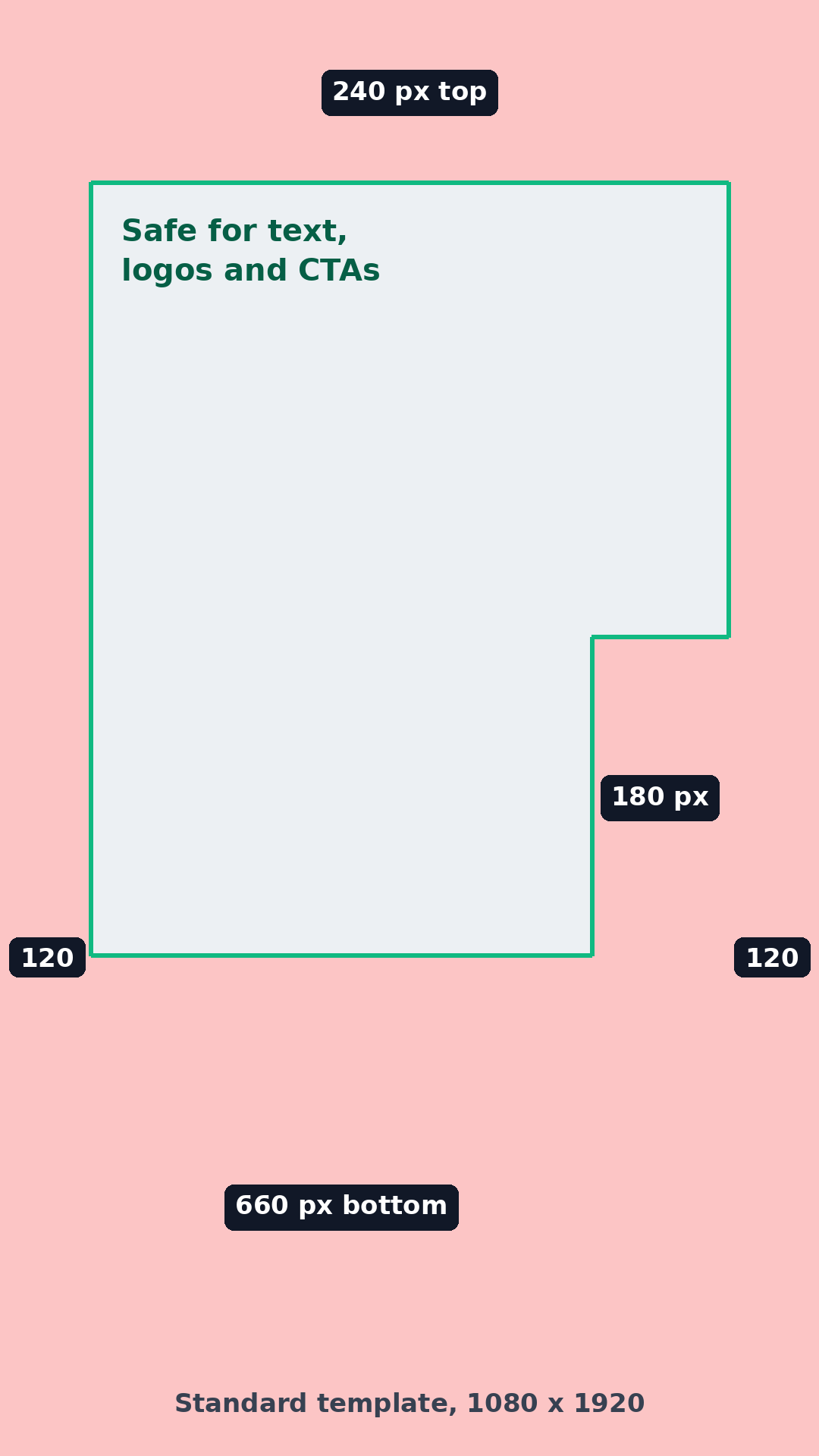
Put headlines and logos in the upper-middle of the frame, roughly between 240 px and 840 px from the top, where the full width (minus side margins) is clear. Below that, keep anything important left of the button column.
How captions and anchors shrink the safe zone
This is the part most guides skip. TikTok's "In-Feed with Anchor" template comes in four versions, one for each caption length from one to four lines. The template's own instructions say they "show how safe zone varied when clients provide different lines of copy." An anchor is the extra product or link bar that sits above the account name, used in shopping and some app ads.
The anchor templates also widen the button column to 240 px (at 1080 x 1920) and start it 360 px from the top, because the anchor layout pushes the icons higher. The top margin grows slightly to 252 px.
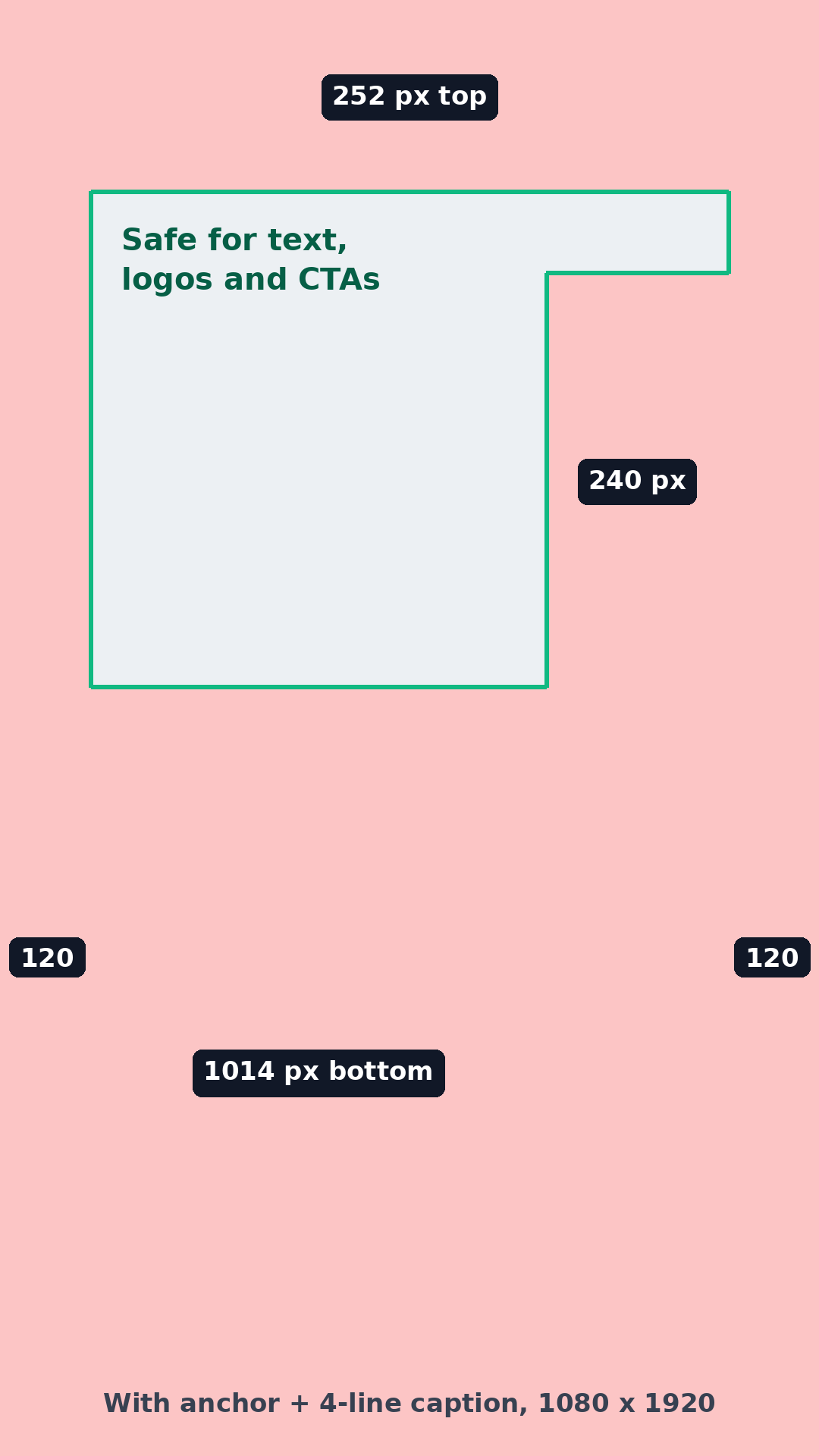
Our rule: design every TikTok ad for the worst case, which is an anchor plus a four-line caption. That means keeping key text inside a box roughly 600 px wide and 546 px tall, starting 360 px from the top and 120 px from the left. It feels cramped. But you rarely control the final caption, especially with Spark Ads, and a CTA hidden behind a "Shop now" bar costs more than a slightly smaller headline.
TikTok also publishes separate right-to-left templates for Arabic-language ads, where the layout mirrors. If you run campaigns in Arabic markets, download those rather than flipping these numbers yourself.
Safe zones for square and horizontal In-Feed ads
Square and horizontal videos sit inside the vertical feed, so the UI overlaps them differently. These are TikTok's labels from the anchor templates with a one-line caption, measured on each format's minimum asset size.
Bottomline: if you're running square or horizontal creative, assume a third of the width is unusable on the right.
TopView ad specs and its two safe zones
TopView is the full-screen ad that plays when someone opens TikTok. It must be a vertical 9:16 video, at least 540 x 960 pixels, 5 to 60 seconds long (TikTok recommends 9 to 15), up to 500MB, with a bitrate of at least 2,500 kbps. It has two safe zones: one for the first 3 seconds and one for the in-feed stage after.
The two-zone setup matters because a TopView changes state. For the first 3 seconds it plays as an open screen with the TikTok logo and a skip control. Then it drops into the feed and picks up the normal caption, buttons and account name. According to TikTok's TopView specifications (updated October 2026), the in-feed stage is the more restrictive of the two.
TopView also has creative rules that In-Feed ads don't spell out as strictly:
- No plain white screen in the first 3 seconds.
- A horizontal trailer is only allowed if the first 3 seconds are vertical.
- Still pictures can't carry the main narrative.
- The video can't be silent, and the audio can't be purely spoken word.
- No QR codes, barcodes, phone numbers or addresses, except in required disclaimers.
- Assets are reviewed within 2 days and can't be changed once preloading starts.
If you're making a TopView, design the first 3 seconds as their own piece. That opening is what pays for the placement.
TikTok carousel ad specs (image ads)
A TikTok carousel ad uses 2 to 35 images in JPG or PNG, at 720 x 1280 (vertical), 640 x 640 (square) or 1200 x 628 (horizontal). TikTok suggests keeping each image at 100KB or less. Every carousel needs music, at least 2 seconds long, as an MP3 up to 10MB. All images share one caption, one CTA and one URL.
Those figures come from TikTok's carousel ad specifications, updated September 2026. Catalog-powered carousels (Video Shopping Ads) are different: they show 2 to 20 images, and each product image can link to its own product page.
Here's the trap. If you pick a track from TikTok's Commercial Music Library and your ad also runs on TikTok Ad Network (TikTok's partner app network, formerly Pangle), the carousel plays silently there. TikTok's fix is to either upload your own licensed track or split the campaign into two ads, one per placement.
Design tip from our side: build carousel frames at 720 x 1280 and treat them like a swipeable story. Readers see one frame at a time, so each image needs to make sense without the others. Our Instagram ad examples show the same principle working on Instagram carousels.
On Non-Spark ads you upload the identity yourself. These limits come from TikTok's In-Feed and reserved-format spec pages.
Why do TikTok ads get rejected for specs?
TikTok ads get rejected for specs when the file falls below the minimum resolution or bitrate, the format isn't accepted, or key text or logos overlap TikTok's interface. Reserved formats like TopView add creative rules: no silent video, no still image as the main content, no white screen in the first 3 seconds, and no QR codes or phone numbers.
Be real: the problems that hurt most don't trigger a rejection at all. A 1:1 video exported for Instagram and uploaded as-is, a CTA sitting in the bottom 300 px, burned-in subtitles running straight under the caption. All three pass upload. Then they underperform, because the ad looks unfinished in the feed.
For ideas on what works inside these limits, our roundup of ad inspiration includes TikTok examples. TikTok's own creative guidance is short and worth following: get your offer in within the first 3 seconds, put the hook within the first 6, and show text at a pace of 5 to 10 words per second.
We've made transparent 1080 x 1920 overlays for both layouts: the standard safe-zone overlay and the worst-case overlay (anchor plus four-line caption). Drop one on the top layer of your project and hide it before export. If you'd rather work from TikTok's originals, they're on the In-Feed spec page.
Designing for other platforms too? Our guides to Google display ad sizes and LinkedIn banner sizes cover the same cropping problems for those channels.
If you'd rather hand TikTok creative off, ManyPixels designers make carousel frames and static ad graphics on every plan. Video editing and motion graphics start on the Business plan at about $1,199/month (check manypixels.co for current pricing). See our ad design services or explore ManyPixels plans.
FAQs
Bottom line
✅ Make every TikTok ad at 1080 x 1920, export as MP4 at 2,500 kbps or higher, and keep text inside the upper-middle of the frame. Treat the anchor-plus-four-line-caption layout as your real safe zone, because you won't always control the caption. Then preview it with an overlay before you upload.
Got an ad that keeps getting covered by the caption? Drop the worst-case overlay on it first. It usually shows you exactly where it's breaking.
Or if you need help editing your videos, try our design subscription service. Motion and video editing services start at just $1,199 a month.
{{VIDEO_BANNER="/dev/components"}}

Having lived and studied in London and Berlin, I'm back in native Serbia, working remotely and writing short stories and plays in my free time. With previous experience in the nonprofit sector, I'm currently writing about the universal language of good graphic design. I make mix CDs and my playlists are almost exclusively 1960s.

Top-quality designers
A complete creative team at your fingertips: graphic designers, illustrators, motion designers and more.
Lightning-fast turnaround
Get started today and receive your first update on the next business day.

All-inclusive pricing
Unlimited requests and revisions. One flat monthly fee. No surprises.

Flexible & scalable model
No contract. Scale up and down as needed. Pause or cancel anytime.
Continue reading



Explore some of our best designs
Get inspired by a curated selection of ManyPixels work. Download the portfolio to see what our team can create.