15 Instagram theme ideas, with examples for each

TABLE OF CONTENTS

TL;DR
An Instagram theme is the consistent visual style that makes a profile recognizable at a glance. It comes down to three decisions: a fixed color palette, one way of editing your photos, and a grid layout you can realistically keep up every week.
- ✅ Easiest theme to maintain: black and white or same-filter. One editing rule, applied to every post, and the grid takes care of itself.
- 🎨 Best for colorful brands: color blocking, as Museum of Ice Cream does with solid pink, yellow and blue backgrounds.
- 📐 Plan for the 3:4 grid: since January 2025, Instagram crops profile previews to 3:4 rectangles, so puzzle and border themes need to be built for that shape.
- 💬 Looking for chat themes instead? Those change the look of your DMs, not your profile. Jump to the chat themes section.
- ⚠️ The theme that fails is the one you can't sustain. Pick a look your team can produce every week, not just for launch.
Someone who lands on your Instagram profile decides in a few seconds whether to follow. They aren't reading captions at that point. They're looking at nine or twelve thumbnails and asking one question: does this account look like it knows what it's doing?
A clear theme answers that question for you. Below you'll find what an Instagram theme actually is, how to build one, 15 theme ideas with a real account showing each, and a quick comparison table to help you choose. If you came here for the chat colors in your DMs, that has its own section further down.
What is an Instagram theme?
An Instagram theme is the consistent look that runs across every post on your profile, so the grid reads as one brand rather than a pile of unrelated images. It covers more than color. A theme also sets how you edit photos, which subjects you shoot, how text appears on graphics and how posts sit next to each other in the grid.
Whatever theme you pick, the rule is consistency. In a good Instagram theme, a stranger could cover the handle and still tell which account they're looking at.
How to create an Instagram theme
Building a theme takes five decisions. Make them once, write them down, and every post after that gets easier.
Choose a theme you can stick to
A black and white feed might feel chic today, but is it an aesthetic you're willing to commit to for the next year? The most important step is choosing carefully, and the best choice usually grows out of your brand identity rather than out of what competitors are doing.
London restaurant Sketch is a good example. Most restaurants post food. Sketch is famous for its interiors, so its feed leans on the rooms themselves. The theme reflects what the brand is actually known for.

Lock in a color palette
Recognizable color is one of the core rules of social media branding. Most brands start from their logo color and add one or two supporting shades. Our guide to building an Instagram color palette walks through this step by step, with hex codes, and these color combinations are a good place to start if you don't have brand colors yet.
Graphics are easy to keep on palette. Photos are harder. A single filter or preset applied to everything is the quickest fix, and a duotone effect can make even mismatched stock photos look like one set.
Plan your grid for the 3:4 format
In January 2025, Instagram switched profile grids from squares to 3:4 rectangles. Posts upload at 4:5 (1080 x 1350 px) and the grid preview crops them slightly. Any theme that depends on how posts line up, such as puzzles, borders or alternating tiles, now has to be designed for that taller shape. You can still tweak an individual preview through the post menu with Adjust preview.
Plan a few posts ahead in a scheduler with a grid preview so you can see how a new post lands before it goes live. Our list of social media design tools covers several free options.
Design your highlights to match
Your story highlights sit right above the grid, so they're part of the theme too. Covers in your palette, with simple icons or single letters, make the whole profile look finished. Aman's highlight covers are plain circles in its muted brand colors, and Ladurée spells out its own name across seven pale green covers.
Keep it fresh without breaking it
A theme shouldn't make your content repetitive. Vary angles, subjects and formats, and change the look gradually rather than with one jarring post. If you need ideas for what to post inside your theme, our guide to creating Instagram content has plenty.
15 Instagram theme ideas
Now that you know how to create one, let’s explore some brilliant Instagram themes that you can copy!
1. Black and white
A black and white theme is one of the easiest to produce, because a single rule (no color) does all the work. It suits photographers and high-end brands that want to signal restraint and elegance.
London photographer Alan Schaller has built a following of around a million on exactly this. His feed is all black, white and gray, and the simplicity is what makes each image stop the scroll.
2. Bright colors
Lots of bright color is a fun way to catch the eye, and building it around your brand colors turns every post into brand recognition. The trick is spreading the colors evenly so no corner of the grid gets crowded with one shade.
Partake Foods mixes orange, blue, purple and pink across its posts, with bold type on many of them. It sounds like a lot, but the colors are balanced so each one gets roughly equal space, and the feed holds together.
3. Color blocking
In a color-blocking theme, each post sits on one solid, usually bright, background. If your brand is colorful and you can't avoid using a range of colors, this is how to keep it from looking chaotic.
Museum of Ice Cream posts its photos against vivid pink, yellow and blue backdrops side by side. The blocks of color catch the eye, and the grid still looks deliberate.
4. Minimalist
A minimalist theme is simple and uncluttered: lots of white space and photos with one clear subject. It's an elegant way to show products, and it lets people take in the whole profile at a glance.
Fittingly, The Minimalist Wardrobe does this well. Simple photos and plain black and white graphics make the feed easy to read.
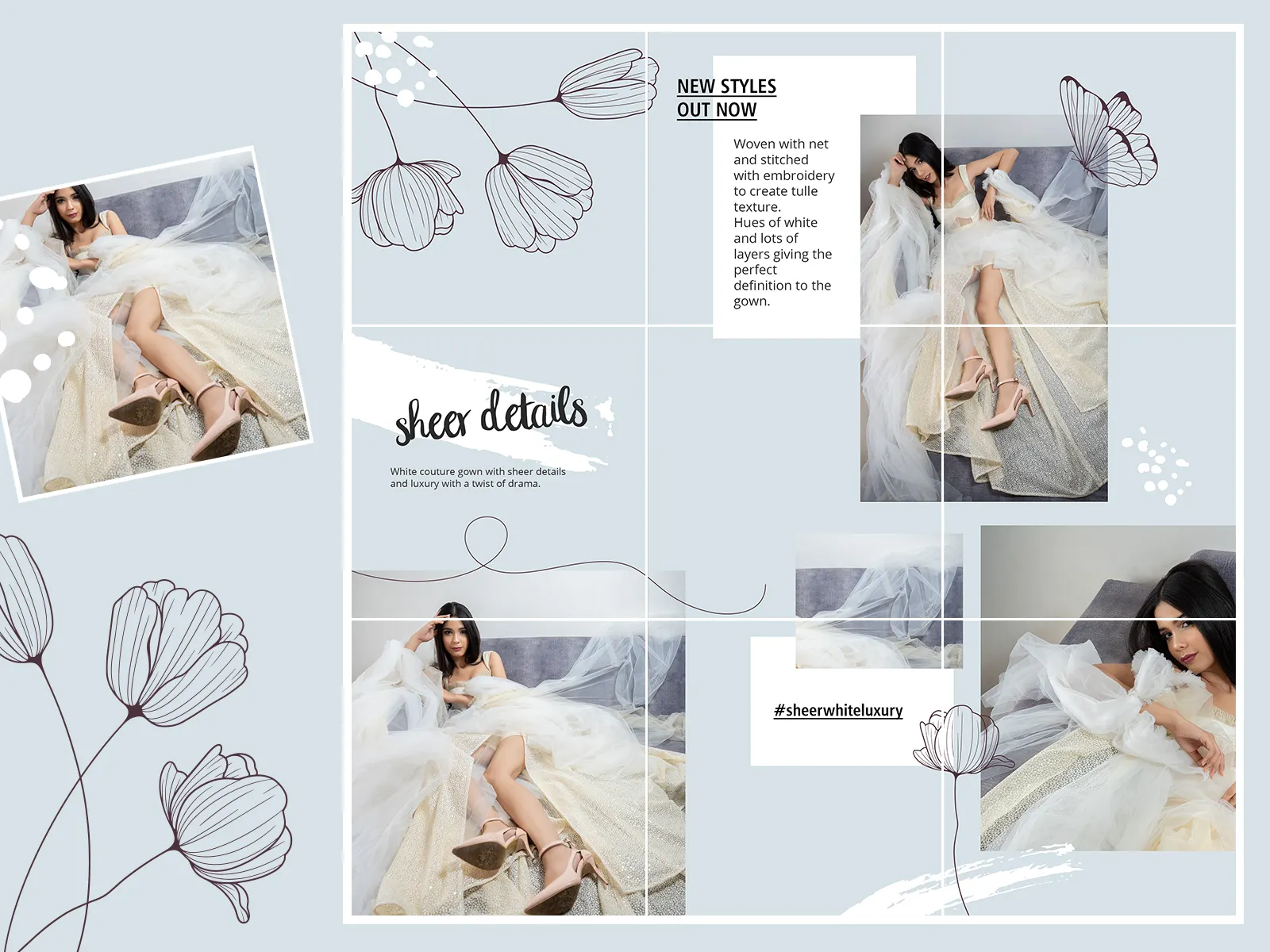
5. Puzzle
A puzzle theme splits one large image across several posts so the grid forms a single picture. Brands often use it ahead of a launch or a big announcement, because it makes followers curious about the full reveal.
It takes the most planning of any theme on this list, and the 3:4 grid has made it harder. Each tile now needs to be cut as a 3:4 section of the big image, and you post the tiles in reverse order so the top-left piece goes up last. Get the crop wrong and the seams show.
6. Borders
Framing every photo in a border helps each post stand out, and it makes the whole feed look consistent no matter what's inside the frames. White is the classic choice, but a border in a brand color works too.
The 3:4 grid has made borders easier. Instagram's Adjust preview option includes a Fit setting that shrinks the post inside the grid tile and fills the space with a white or black background, so you get a bordered look without editing every image.
7. Same Filter Theme
Use the same filter, whether that's a VSCO filter, a Lightroom preset or something else, on every photo you post. Everything then coordinates, however varied the content is.
Creator Kiara Madisen's photos are taken in different places and different light, but they look like one set. A consistent edit across every image is what ties them together.
8. No Filter
There's no rule that says you have to use filters. A no-filter feed can look more honest and unique, and it's a good fit if you don't have time to edit every photo. What holds it together is subject matter rather than color.
Ontario-based Rustic Urban Furniture doesn't filter its product photos, yet the feed still looks cohesive because every image shows the same kind of handmade wooden furniture.
9. Seasonal
Shifting your theme with the seasons is a natural way to promote products through the year. Mark the holidays that matter to your audience, then work their colors into your posts in the weeks before.
Insomnia Cookies does this for Valentine's Day, filling its feed with pinks, reds and heart-shaped cookies a month ahead.
Ladurée is doing the same for the holidays: as of November 2026, its usual pastel feed has gone gold, with advent calendars and gift boxes, but the soft blue-gray backgrounds and macaron close-ups keep it recognizably Ladurée.
10. Geometric
A geometric theme uses shapes and patterns to grab attention. Post images with strong lines and repeating forms consistently, and over time the grid fills with pattern.
Naqsha Designs advertises its hand-painted pieces this way, so the geometry of the work becomes the theme of the feed.
11. Neon accents
Neon color has made a real comeback with younger audiences, but a fully neon feed is tiring to look at. The version that works is neon as an accent: ordinary photos, with neon type or graphics doing the branding.
Spotify is a good example. Almost every Reel cover on its profile uses the same template, with bold capitals across the lower third in neon orange, pink, cyan or green. The photos vary from interview to interview, but the template makes the whole grid read as Spotify.
12. Pastel
Pastels are easy on the eye and flexible enough to suit plenty of brand identities. They're often linked with bakeries and weddings, but there's no reason more "serious" brands can't use them.
Glossier has built a whole brand around a soft pink. Its feed repeats that pink across products, packaging and graphics, and the story highlight covers follow the same palette.
14. Dark
Dark themes feel moody and premium, and they suit nightlife, tech and luxury brands. A dark theme doesn't have to mean black and white: neutral color accents can make a dark feed look warmer and more elegant.
Knot to Self pairs dark backgrounds with soft neut
ral tones, so the feed feels considered rather than gloomy.
14. Product-focused
If you follow brands on Instagram, you already know this one. Whether it's coffee, skincare or jewelry, a product-focused theme is all about one hero product. The hard part is keeping it from looking repetitive.
Converse solves this well. Most posts feature the Chuck Taylor, but shot from different angles, in different settings and in different styles, including top-down flat lays. The shoe is the constant, and everything around it changes.
15. Lifestyle
Lifestyle themes cover travel, fitness, food and everything in between. They're tricky because the subjects change constantly. What holds them together is one dominant tone that runs through very different scenes.
Aman, the luxury hotel group, posts temples, beaches, city towers and mountain retreats, yet the feed looks like one story. Almost every image is soft, misty and muted, and the thin, widely spaced AMAN wordmark appears on many posts. Even the highlight covers are plain circles in the same earthy tones.
Instagram chat themes: how to change them and what the options are
Instagram chat themes change how a direct message conversation looks, not your profile. To change one, open the chat in Messages, tap the person's or group's name at the top, tap Theme, and pick an option. The new theme applies straight away, and everyone in the chat sees it.
- Open Instagram and tap the Messages icon.
- Open the conversation you want to change.
- Tap the name of the person or group at the top of the chat.
- Tap Theme.
- Tap a theme, or a color or gradient. There's no save button: the chat switches as soon as you tap.
Instagram gives you three kinds of option, and they don't all do the same thing.
A few things worth knowing before you change one:
- The other person sees it too. The theme belongs to the conversation, not to you, and Instagram usually posts a small "changed the theme" notice in the chat.
- The theme list rotates. Instagram adds themes for holidays, events and partnerships and retires others. It added Love and Lollipop among others in its March 2024 messaging update, so the list on your phone today may not match a screenshot from last year.
- You can't use your own hex code. Outside of Create with AI, you choose from Instagram's preset colors and themes only.
- Group chats work the same way. Tap the group name, then Theme.
- To go back to the default, open Theme again and choose the default option at the start of the list.
- Don't see Theme at all? Update the Instagram app first. That fixes it in most cases.
How to choose the right Instagram theme
Start from your brand and your capacity, not from what looks nicest in someone else's feed.
- 📸 You mostly post photos and have little design time: same filter, black and white, or no filter.
- 🎨 Your brand is built on bold color: bright colors or color blocking.
- 🛍️ You sell one hero product: product-focused, with deliberate variety in angles and settings.
- 🎬 Your feed is mostly Reels: a branded cover template, like Spotify's neon accents, matters more than the photos themselves.
- 🚀 You're launching something: a puzzle grid, planned in 3:4, for the launch window only.
- ❌ Avoid: any theme that needs custom graphics for every post unless you have someone to make them every week.
If you're setting up a business profile from scratch, pick the right Instagram business category at the same time. And when you start running ads, keep them in your theme too, so people who tap through land somewhere that looks familiar. Our guide to making Instagram ads covers the rest.
Frequently asked questions
The bottom line
✅ A strong Instagram theme isn't about the trendiest look. It's about three decisions (palette, editing, layout) made once and applied every week. Pick from the comparison table based on what you can sustain, design for the 3:4 grid, and let your highlights and Reel covers follow the same rules.
🚀 If the theme you want needs more graphics than your team can make, that's a capacity problem, and it's one we solve every day. Explore ManyPixels plans.
{{SOCIAL_BANNER="/dev/components"}}
---
Rafaella Aguiar is the Marketing Manager at Kicksta. She specializes in content, social media, and email marketing. You can find more daily marketing tips from her at kicksta.co.

Discover an array of captivating voices and expert insights as our guest writers grace the pages of the Manypixels blog. From seasoned industry veterans to emerging talents, their thought-provoking articles will inspire and inform, enriching your reading experience.

Top-quality designers
A complete creative team at your fingertips: graphic designers, illustrators, motion designers and more.

Lightning-fast turnaround
Get started today and receive your first update on the next business day.

All-inclusive pricing
Unlimited requests and revisions. One flat monthly fee. No surprises.

Flexible & scalable model
No contract. Scale up and down as needed. Pause or cancel anytime.
Continue reading


Explore some of our best designs
Get inspired by a curated selection of ManyPixels work. Download the portfolio to see what our team can create.