Design feedback: a framework for marketing teams who aren't designers

TABLE OF CONTENTS


TL;DR
Too often marketers give taste-based reactions instead of goal-based direction. "Make it pop" tells a designer nothing. "The CTA isn't standing out enough for a cold-audience ad" tells them exactly what to fix. This guide walks you through a five-step feedback framework that cuts revision loops and gets you to a final version faster, even if you've never studied design.
Why design feedback usually breaks down
Design feedback breaks down when it's about personal preference rather than project goals. Vague reactions like "this doesn't feel right" or "can we make it more dynamic" give designers nothing concrete to work with. Without a clear connection to the campaign objective, the audience, or the original brief, every revision is a guess.
When a designer receives unclear feedback, they face two options: guess at what you mean, or ask a clarifying question that delays the project. Most choose the former. The result is revision rounds that loop back to the same dissatisfaction because the underlying issue was never named.
The good news: this is almost always fixable without any design knowledge. You don't need to know the difference between a serif and a sans-serif to give useful feedback. You just need to know what the design is supposed to do, and whether the current version does it.
The shift that makes feedback work: goals over taste
Effective design feedback connects observations to outcomes. Instead of "I don't like the color," say "the blue feels too corporate for this product launch, which targets a younger consumer." You haven't prescribed a solution. You've given the designer a clear problem to solve.
The requests that go through the fewest revision rounds almost always have one thing in common: the brief explains the purpose of the piece, not just aesthetic preferences. That context makes every feedback round sharper. If you haven't written a clear design brief before submitting, that's often where the problem starts.
A five-step framework for giving design feedback
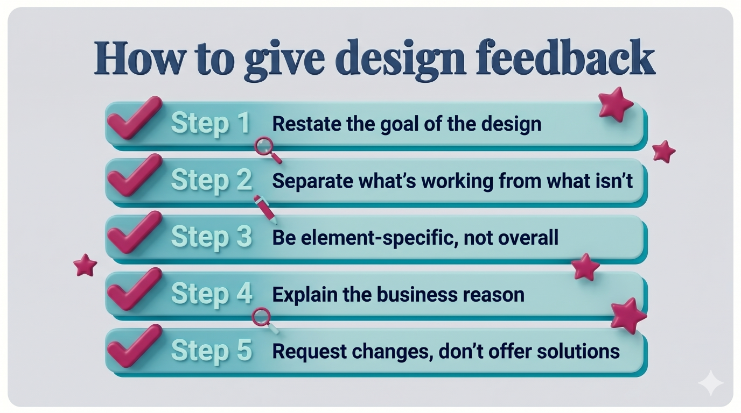
This framework works for any design review: social media graphics, landing pages, presentations, email headers. It's not a rigid checklist, it's a thinking sequence. Follow it in order and your feedback message will be cleaner, faster to act on, and less likely to trigger a loop.
Step 1: Restate the goal before anything else
Before listing what you want changed, write one sentence restating the goal of the piece. "This ad is meant to drive sign-ups from cold audiences on LinkedIn." It anchors the whole feedback conversation. If your designer had a different understanding of the goal, you'll catch that mismatch here, before it becomes a revision problem.
Step 2: Separate what's working from what isn't
Most feedback messages jump straight to problems. That's a mistake. Telling your designer what's working ("the color palette is right, the logo placement is clean") tells them what not to change. Designers who don't hear this often over-revise, adjusting things you liked while trying to fix things you didn't mention. Be explicit.
Step 3: Be element-specific, not overall
"This doesn't look right" is not feedback. "The CTA button is getting lost because it's the same visual weight as the background shape behind it" is feedback. Point to specific elements and describe what they're doing, or failing to do, in context.
If you don't know the design term, describe it plainly. "The text in the bottom left corner is hard to read on mobile" is perfectly useful. Your designer will know what to fix.
Step 4: Explain the business reason
For every change you're requesting, add a short reason. "The font feels too decorative for our brand" becomes more useful with: "...our brand guidelines call for a clean sans-serif to support readability in technical content." You're not expressing a preference. You're giving the designer a constraint they can work within.
Not sure what your brand guidelines say? That's worth resolving before the next project. Consistent brand guidelines are one of the fastest ways to cut rounds across all your design work.
Step 5: Request, don't redesign
The most common mistake non-designer reviewers make is prescribing solutions rather than naming problems. "Can you move the logo to the top left, make the headline blue, and add a border?" is a redesign instruction. "The logo isn't prominent enough and the headline isn't drawing the eye" is the problem. Let the designer solve it. They're better at that, and that's the whole point of having one.
How to handle stakeholder input before sending feedback
Before sending feedback to your designer, consolidate all input from stakeholders into a single message. Drip-feeding feedback across multiple rounds (your notes first, then your manager's, then legal's) is one of the most expensive habits in a design workflow. Each round costs time and risks undoing previously approved decisions.
The practical fix: hold a short internal review with anyone who needs to sign off before you send a single word to your designer. Where stakeholders disagree, make a decision and send one consolidated note. Designers can handle a lot of feedback at once. They can't handle contradictory directions from multiple approvers.
Common feedback mistakes and what to say instead
These come up in almost every design review, and they're all fixable with a small adjustment.
"Make it pop." This is the most meaningless phrase in design feedback. Pop means nothing without context. What you probably mean: "This needs more visual contrast to grab attention in a crowded feed" or "The offer isn't standing out enough against the background." Say that instead.
"I'll know it when I see it." This isn't feedback, it's an invitation to guess until you're happy. If you can't describe what you're looking for, go back to the brief and ask: what does this design need to make someone do? Start from there.
"Can you make it look more like [competitor's design]?" Reference images are genuinely useful. But "make it look like this" without explanation creates a knock-off, not a solution. When sharing a reference, explain what specifically you want to capture. "I like how this uses white space to keep it from feeling cluttered" is useful. "Make it look like this" is not.
"My CEO doesn't like it." Executive opinions are valid inputs, but this tells a designer nothing. Translate reactions into design-relevant feedback. "Our CEO feels this looks too casual for the enterprise audience we're targeting" gives the designer somewhere to go.
"This just isn't working." If you find yourself writing this, pause and ask: what was the goal, and what specifically is the design failing to achieve? That's your feedback. The vague reaction is a signal you haven't named the actual problem yet.
How to structure a written feedback message
A good written feedback message follows a four-part structure: (1) restate the goal in one sentence, (2) note what's working, (3) list specific changes with business reasons, (4) confirm next steps and timeline. This format takes five minutes to write and saves hours of back-and-forth.
Here's a template you can copy directly:
🎯 "Goal of this piece: [one sentence].
✅ What's working: [specific elements to keep].
❌ Changes needed: [element] + [reason why]. [Element] + [reason why].
👉 Next step: please revise and share a second draft by [date]. Let me know if you have questions."
That's it. No essays. The designer has everything they need, and nothing they don't.
If you're working with an external design team, written feedback matters even more than in an in-house context. External designers don't pick up the ambient context your internal team absorbs over time. The more specific your written notes, the fewer rounds you'll need
Services like graphic design subscriptions often let you communicate directly with your designer or project manager, which makes this kind of structured feedback especially easy to put into practice.
{{GRAPHIC_BANNER="/dev/components"}}
When to escalate: recognizing a real revision loop
A revision loop is when you've given the same feedback more than twice and the design still isn't landing. When this happens, it's usually a sign of one of three problems: the brief was unclear from the start, stakeholder feedback has been contradictory, or there's a genuine mismatch between what the designer can produce and what the project needs. More revision notes won't fix any of these.
The right move: stop the revision cycle and have a short conversation. Walk the designer through the goal and the problem from scratch. Often you'll find that you and the designer have been solving for different things, and that's fixable in five minutes on a call, but not in ten rounds of revision notes.
If the work still isn't landing after realignment, it may be a fit issue. It's better to address that directly than to keep requesting changes.
Which approach fits your situation
If you're reviewing design alone: Use the five-step framework. Write your full feedback as a single message before sending anything, not as a running conversation.
If you have multiple stakeholders: Run a quick internal review before sending anything. Designate one person to compile and send the consolidated feedback.
If you're working with an external design service: 👉 Written feedback rounds matter even more here. External teams don't have background context your in-house team picks up passively. More specific notes mean fewer rounds.
If you're in a revision loop: Stop sending notes. Have a conversation. Revision messages won't fix a brief problem.
If the designer is consistently missing the mark: Review whether your briefs are giving enough context before assuming the issue is quality. Unclear direction produces unclear output, almost every time.
FAQs
Bottom line
Good design feedback isn't about having strong opinions on aesthetics. It's about connecting what you see to what the design is supposed to do. Marketing teams that make this shift cut their revision rounds, get better output, and make their designers' jobs easier in the process. Start with the goal. Be specific about what's not working and why. Let the designer solve the problem. That's the whole framework.

Having lived and studied in London and Berlin, I'm back in native Serbia, working remotely and writing short stories and plays in my free time. With previous experience in the nonprofit sector, I'm currently writing about the universal language of good graphic design. I make mix CDs and my playlists are almost exclusively 1960s.

Top-quality designers
A complete creative team at your fingertips: graphic and web designers, illustrators, and more.

Lightning-fast turnaround
Get start today and receive your first update on the next business day.

All-inclusive pricing
Unlimited requests and revisions. One flat monthly fee. No surprises.

Flexible & scalable model
No contract. Scale up and down as needed. Pause or cancel at anytime.
Continue reading


Explore some of our best designs
Get inspired by a curated selection of ManyPixels work. Download the portfolio to see what our team can create.